
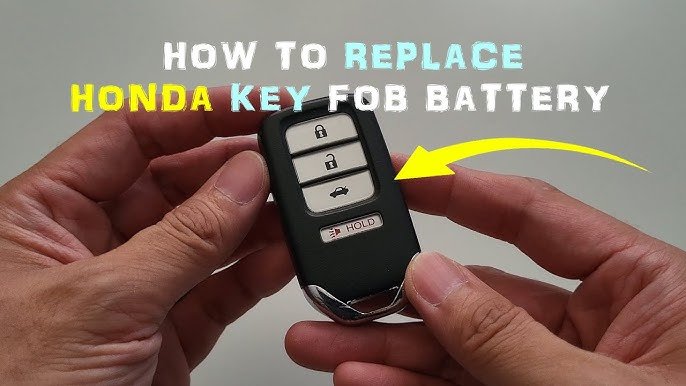
Is your Honda Accord key fob acting up or not working at all? It might be time to change the battery.
You don’t have to rush to the dealership or spend money on a replacement. With just a few simple steps, you can fix it yourself in minutes. Imagine the ease of unlocking your car without any hassle. Keep reading, and you’ll learn exactly how to change the battery in your Honda Accord key fob quickly and easily.
This guide will save you time, money, and frustration.

Credit: www.youtube.com
Tools Needed
Changing the battery in your Honda Accord key fob is simple with the right tools. Having these tools ready makes the process faster and easier. No special skills needed. Just gather the items below before starting.
Small Flathead Screwdriver
This tool helps open the key fob case gently. It fits into the small slot to pry open the cover without damage.
New Battery (cr2032)
The Honda Accord key fob uses a CR2032 battery. Make sure to buy a fresh one for proper function.
Clean Cloth Or Soft Surface
A soft cloth protects the key fob from scratches. Place the fob on it while working.
Tweezers
Tweezers help remove and place the battery carefully. They prevent touching the battery with fingers, which can cause corrosion.

Credit: www.youtube.com
Locate The Key Fob Release
Locate the Key Fob Release Find the small button or switch on the side of the Honda Accord key fob. Press it gently to release the key fob cover, allowing access to the battery compartment. This step is crucial for replacing the battery effectively.
Locating the key fob release is the first step in changing the battery. This small mechanism allows you to access the battery compartment. Understanding its position and function is crucial for an easy battery change.
Understand The Key Fob Design
The Honda Accord key fob has a sleek design. Within this design lies the release button. Familiarizing yourself with the fob's layout makes the process smoother.
Identify The Release Button
The release button is small and sometimes hard to spot. It is usually located on the back or side of the key fob. Gently pressing it will unlock the cover.
Use Proper Tools
A small flathead screwdriver helps in opening the fob. Be careful not to scratch or damage the surface. A gentle touch is key for successful opening.
Practice Patience
Opening the key fob requires patience. Rushing could lead to breaking the cover. Take your time and gently press and slide the release mechanism.
Open The Key Fob
Opening the key fob is the first step in changing the battery of your Honda Accord key fob. The key fob protects the internal parts, so handle it with care. You need to open it gently to avoid any damage.
Most Honda Accord key fobs have a small groove or notch. This helps you pry the fob open without tools. Use your fingernail or a flat object like a coin or small screwdriver.
Work slowly and carefully around the edges. The fob case usually splits into two halves. Once open, you can access the battery inside.
Locate The Opening Groove
Find the small groove on the side of the key fob. It is often near the key ring. This groove is where you will insert your tool or fingernail.
Use A Flat Tool To Pry The Fob
Insert a flat tool like a coin or small screwdriver into the groove. Twist gently to separate the two halves. Avoid using too much force to prevent breaking the case.
Separate The Two Halves Carefully
Once the edges start to open, use your fingers to pull the halves apart. Do not rush this step. Keep the internal parts steady while opening.
After opening, you will see the battery inside the key fob. Note the battery type and position before removing it. Gently lift the battery out using your fingers or a small tool.

Credit: www.youtube.com
Remove The Old Battery
Removing the old battery from your Honda Accord key fob is a simple task that anyone can handle with a little care. It’s the crucial step before installing a fresh battery to keep your key fob working smoothly. Taking your time during this process can save you from damaging the fob or the new battery later on.
Gather Your Tools And Prepare Your Workspace
Before opening your key fob, make sure you have a small flathead screwdriver or a coin handy. A clean, well-lit surface will help you avoid losing small parts. You might be surprised how easily tiny screws or clips can slip away without you noticing.
Locate The Seam And Open The Key Fob Carefully
Look for the seam where the two halves of the key fob meet. This is usually along the edge of the fob. Insert your tool gently into the seam and twist slightly to pry it open—avoid using excessive force to prevent cracking the plastic.
Remove The Battery Without Damaging The Contacts
Once the key fob is open, you’ll see the battery sitting in a small compartment. Use your tool or fingers to carefully lift the battery out. Be mindful of the metal contacts; bending or breaking them can make your fob stop working entirely.
Inspect The Battery And Compartment For Damage
Take a moment to check if the battery compartment looks clean and undamaged. Corrosion or dirt can affect the new battery’s performance. A quick wipe with a dry cloth can often improve contact and extend the life of your key fob.
Choose The Right Replacement Battery
Choosing the right replacement battery is crucial for your Honda Accord key fob. The battery powers the remote functions and ensures smooth operation. Using an incorrect battery may cause damage or poor performance.
Always check the key fob’s battery type before buying a replacement. Most Honda Accord key fobs use a specific coin cell battery, but versions can vary by model year. Identifying the correct battery helps avoid mistakes.
Identify The Battery Model Number
Look inside your key fob to find the battery model number. It is usually printed on the battery itself. Common models include CR2032 or CR2025. Write down this number to buy the exact match.
Buy High-quality Batteries
Choose batteries from trusted brands for better reliability. Cheap batteries can leak or lose power quickly. High-quality batteries last longer and protect your key fob’s electronics.
Check Battery Specifications
Compare battery voltage and size before purchase. Most key fob batteries have a 3-volt rating. The physical size must fit perfectly in the battery compartment. Incorrect size or voltage can cause failure.
Purchase From Reliable Sources
Buy batteries from stores or online sellers with good reviews. Avoid unknown brands or suspiciously low prices. Reliable sources reduce the risk of counterfeit or poor-quality batteries.
Insert The New Battery
Inserting the new battery into your Honda Accord key fob is a simple task. Handle the battery with care to avoid damage. Make sure the battery is the correct type for your key fob model. Align the battery properly to ensure the key fob functions well after replacement.
Check The Battery Orientation
Look for the plus (+) and minus (-) signs inside the battery compartment. Place the new battery with the positive side facing up. Incorrect placement can stop the key fob from working. Double-check the orientation before closing the key fob.
Place The New Battery Carefully
Use your fingers or a small tool to insert the battery gently. Avoid touching the battery surface with oily or dirty hands. The battery should fit snugly without forcing it. A loose battery may cause connection issues.
Close The Key Fob Securely
Align the two halves of the key fob case carefully. Press them together until you hear a click or feel them snap into place. Ensure there are no gaps around the edges. A properly closed key fob keeps the battery in place and protects internal parts.
Reassemble The Key Fob
After replacing the battery in your Honda Accord key fob, putting it back together correctly is crucial. A well-reassembled key fob ensures that all buttons work smoothly and the device remains protected from dust and moisture. Careful reassembly also prevents any damage to the internal components you just handled.
Align The Key Fob Halves Properly
Start by lining up the two halves of your key fob. Check that the buttons sit correctly in their slots and nothing is pinched. Misalignment can cause buttons to stick or not function at all.
Press the halves gently together to feel if any parts are out of place. If you notice resistance, stop and double-check the battery’s position and the button alignment. Patience here saves you from having to open it again.
Secure The Key Fob Clips Or Screws
Depending on your Honda Accord model, your key fob might have small clips or screws holding it together. If clips are used, press firmly until you hear a click on all sides. This click confirms the halves are locked in place.
For screws, use a small screwdriver to tighten them securely but avoid overtightening. Overdoing it can crack the plastic housing or strip the screws, making future battery changes harder.
Test The Key Fob Buttons
Once reassembled, test each button before putting your key fob back in your pocket. Lock and unlock your car, and check the panic button if your fob has one. If any button feels sticky or unresponsive, reopen the fob and inspect the alignment again.
Imagine how frustrating it would be to think the battery is faulty when the issue is actually a misaligned button. Taking a moment now prevents that confusion.
Test The Key Fob
Testing your Honda Accord key fob after changing the battery is crucial to ensure everything works perfectly. It’s the moment you find out if your efforts paid off or if you need to troubleshoot further. Simple tests can save you time and frustration before you close everything up.
Check The Lock And Unlock Buttons
Start by pressing the lock and unlock buttons on your key fob while standing near your car. If the doors lock and unlock in response, your battery replacement was successful. If nothing happens, try pressing the buttons a few times or hold them down briefly to confirm.
Observe The Key Fob Light Indicator
Most Honda Accord key fobs have a small LED light that flashes when you press any button. Look carefully for this light as it’s an immediate sign your key fob is powered. If the light doesn’t come on, your new battery might not be seated properly or could be dead.
Test The Trunk Release And Panic Button
Don’t forget to test other buttons like the trunk release and the panic alarm. These functions use the same battery and can reveal if the battery is truly working. Press these buttons and listen for sounds or look for the trunk opening to confirm.
Try Using The Key Fob At Different Distances
Walk away from your car and try the key fob at varying distances. A weak or bad battery often reduces the remote’s range. Check if the buttons still respond when you’re about 10 to 20 feet away to ensure the signal strength is good.
What To Do If The Key Fob Doesn’t Work
- Double-check the battery orientation inside the key fob.
- Clean the battery contacts with a dry cloth.
- Try a fresh battery from a different pack.
- Consider resetting the key fob by removing the battery for a few minutes.
Have you ever replaced a battery and still faced problems? Testing thoroughly helps you avoid that frustration and gives you confidence your key fob is ready to go.
Tips For Battery Maintenance
Maintaining your Honda Accord key fob battery helps avoid sudden failures. Small efforts extend battery life and keep your key fob working smoothly. Proper care saves time and money on replacements.
Follow these simple tips to keep your key fob battery in good shape. Regular checks and careful handling prevent common battery issues.
Store Key Fob Away From Extreme Temperatures
Heat and cold can reduce battery life quickly. Avoid leaving your key fob in direct sunlight or freezing conditions. Keep it in a cool, dry place whenever possible.
Replace Battery Before It Dies
Don’t wait until the key fob stops working completely. Replace the battery as soon as you notice weak signals or slower response. Early replacement prevents lockouts and inconvenience.
Clean Battery Contacts Regularly
Dirt and corrosion on battery contacts can cause poor connection. Use a soft cloth or cotton swab with rubbing alcohol to clean contacts gently. This ensures good power flow and longer battery life.
Remove Battery If Not Using For A Long Time
When you do not use the car or key fob for weeks, remove the battery. This avoids battery drain and damage from leaks. Store the fob and battery separately in a dry place.
Use High-quality Replacement Batteries
Choose reliable brands for replacement batteries. Cheap batteries may fail faster or leak. Good quality batteries give consistent power and protect your key fob’s internal parts.
Frequently Asked Questions
How Do I Open A Honda Accord Key Fob?
To open the Honda Accord key fob, use a small flathead screwdriver. Insert it into the seam and gently pry it apart. Be careful not to damage the plastic casing or internal components during this process.
What Type Of Battery Does Honda Accord Key Fob Use?
Honda Accord key fobs typically use a CR2032 lithium coin battery. Always check your key fob’s manual or existing battery to confirm the exact type. Using the correct battery ensures proper functionality and longevity of the key fob.
How Often Should I Change My Key Fob Battery?
You should change your Honda Accord key fob battery every 1 to 2 years. Battery life depends on usage frequency and environmental factors. Replace the battery promptly if you notice reduced signal range or inconsistent key fob performance.
Can I Change The Key Fob Battery Myself?
Yes, you can change the battery yourself with basic tools and care. Follow the steps to open the fob, replace the battery, and reassemble it. DIY replacement saves time and money compared to professional services.
Conclusion
Changing the battery in your Honda Accord key fob is quick and simple. With just a few steps, you can do it yourself at home. This saves time and avoids trips to the dealer. Always use the correct battery type to ensure your key fob works well.
Keep your old battery safe until you finish. Now, your key fob should work like new. Stay prepared by knowing this easy fix whenever your key fob battery dies. Small tasks like this help keep your car running smoothly.