
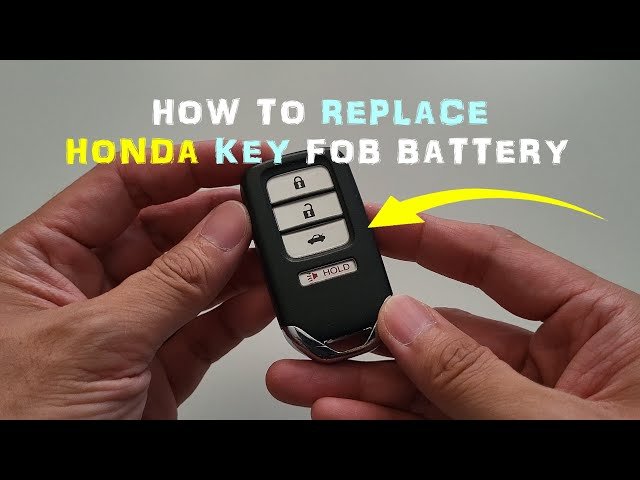
Is your Honda Civic key fob acting up or not working at all? It might be time to change the battery.
Knowing how to replace your key battery yourself can save you time and money. Plus, it’s easier than you think. In this guide, you’ll get simple, step-by-step instructions to get your key fob working like new again. Keep reading, and you’ll be back on the road with full control of your Honda Civic in no time.

Credit: www.youtube.com
Tools Needed
Before you dive into changing the key battery of your Honda Civic, gathering the right tools will make the process smoother and faster. Having everything on hand prevents frustration and saves you from unnecessary trips to the store. You might think a simple job like this requires just a battery, but some tools can make a huge difference in ease and safety.
Essential Tools For Changing Your Honda Civic Key Battery
- Small Flathead Screwdriver– This is crucial for prying open the key fob without damaging the plastic casing. A precision screwdriver set often works best.
- Replacement Battery– Most Honda Civic keys use a CR2032 battery, but always check your key to confirm. Using the wrong battery can cause malfunction or damage.
- Clean Cloth or Gloves– Protect the internal components from oils and dirt on your fingers. It also helps prevent static discharge that can harm electronics.
Optional But Helpful Tools
- Tweezers– Handy for removing and placing the small battery without dropping it inside the key fob.
- Magnifying Glass– Helps you see tiny screws or components clearly if you’re working in low light or have vision challenges.
Have you ever tried to open a key fob without the right tool? It’s easy to scratch or break the plastic, which can lead to costly repairs. Using the right screwdriver and taking care with each step makes the job stress-free and keeps your key looking like new.

Credit: www.youtube.com
Locate The Key Fob
Before you can change the key battery on your Honda Civic, you need to find the key fob itself. It’s not just about locating it physically but understanding the type of key fob you have. Different models and years might have slight variations, so knowing exactly where your key fob is and what it looks like helps avoid confusion later.
Think about the last time you misplaced your key fob. Did you check the usual spots like your bag, jacket pocket, or the car’s center console? Sometimes, the key fob hides in plain sight, and recognizing its design can speed up the battery replacement process.
Identify Your Honda Civic Key Fob Model
Honda Civics come with a few types of key fobs. You might have a traditional remote key, a smart key, or a keyless entry fob. Identifying which one you own is crucial because the battery type and replacement steps can differ.
- Look for buttons on your fob – lock, unlock, trunk release
- Check if the key blade flips out or is separate
- Note the year of your Civic to match with your fob type
Locate The Key Fob On Your Keychain Or In Your Car
Most Honda owners keep their key fob on a keyring with other keys. Check your pockets or bags first. If you usually leave it in the car, look in the cup holders, glove compartment, or under the seats.
Sometimes, the key fob can be inside the car’s interior storage compartments. If you have a Honda Civic with push-button start, the key fob might be inside your purse or car door pocket. Have you ever found it exactly where you least expected?
Recognize The Battery Compartment On The Key Fob
Once you have your key fob in hand, the next step is to spot the battery compartment. It’s typically a small panel on the back or side of the fob. Finding this panel is necessary before you can open the fob to replace the battery.
- Look for a small notch or seam along the edges
- Use your fingernail or a flat tool to gently pry it open
- Handle the fob carefully to avoid damaging internal components
Open The Key Fob
Opening the key fob is the first step to change the key battery on a Honda Civic. The key fob protects the battery and electronic parts inside. You need to open it carefully to avoid damage. Use the right tools and gentle force. This section explains how to open the key fob safely and easily.
Locate The Seam Of The Key Fob
Find the thin line where the two halves of the key fob meet. This seam runs around the edge of the fob. It is the point where the cover can be separated.
Use A Small Flat Tool To Pry Open
Use a small flathead screwdriver or a coin. Insert it gently into the seam. Twist the tool slowly to create a small gap.
Separate The Two Halves Carefully
Once the gap is visible, use your fingers to pull the halves apart. Avoid using too much force to prevent cracking. The fob should open smoothly.
Remove The Internal Components With Care
Inside the fob, you will see the battery and circuit board. Handle these parts gently to avoid damage. Now the battery is ready to be replaced.
Remove The Old Battery
Removing the old battery from your Honda Civic key fob is a simple task, but it requires care and attention. This step is crucial because a damaged or improperly handled battery can affect the key's performance or even cause damage. Knowing how to safely open your key fob and take out the battery will save you time and frustration.
Locate The Battery Compartment
Start by finding the small notch or seam along the edge of your key fob. This is where you will pry it open. If you’ve never done this before, use a thin, flat tool like a small screwdriver or a coin to gently separate the two halves of the fob.
Be gentle to avoid cracking the plastic. You might feel some resistance, which is normal. Take your time and avoid forcing it open too quickly.
Remove The Battery Carefully
Once the fob is open, you’ll see the battery sitting in a small compartment. The battery is usually a flat, round silver disc, often labeled with numbers like CR2032. Use your fingers or a small tool to lift the battery out carefully.
Watch out not to touch the circuitry inside the fob with metal tools, as this can cause damage. If the battery feels stuck, try gently rocking it free instead of pulling hard.
Check The Battery Type And Orientation
Before you discard the old battery, note the type and how it’s placed. Most Honda Civic keys use CR2032 batteries, but it’s wise to double-check. Also, observe which side is facing up — usually, the positive (+) side is visible.
This detail ensures you insert the new battery correctly. Incorrect placement can prevent your key from working properly, and you might waste time trying to figure out why.
Insert The New Battery
Place the new battery in the key fob with the positive side facing up. Press it down gently until it fits securely inside. Ensure the battery sits flat to avoid connection issues.
Changing the key battery in a Honda Civic is a simple task. Once you've removed the old battery, the next step is to insert the new one. This process ensures your key fob works smoothly and reliably. Below are the detailed steps to help you with this task. Gently pry open the key fob using a small screwdriver. Be careful not to damage the casing. Take out the old battery using a flat tool. Ensure you remember the battery's position. Place the new battery into the slot. Make sure the positive side faces up. This ensures proper functionality.
Secure The Key Fob
Align the key fob halves and press them together. Listen for a click to ensure it's securely closed. Press the buttons on the key fob. Confirm they work correctly. If not, recheck the battery position. Following these steps ensures a seamless battery replacement. Enjoy the convenience of a fully functional key fob.

Credit: www.youtube.com
Reassemble The Key Fob
Reassembling the key fob is the final and important step after changing the battery. This process ensures the key fob works correctly and stays protected. Take your time and handle each part carefully to avoid damage.
Use a clean, flat surface to organize the pieces. This helps prevent losing small parts during assembly. Align the key fob halves properly before snapping them together. A loose fit can cause malfunction or allow dirt inside.
Check The Battery Placement
Confirm the new battery sits flat in its slot. The positive (+) side should face up, as shown in the key fob diagram or manual. Incorrect placement stops the key from working.
Align The Key Fob Halves
Match the edges and buttons of both halves carefully. Press the pieces gently but firmly together. Listen for a click, indicating the parts have locked into place.
Secure The Screw Or Clip
Some Honda Civic key fobs have a small screw or clip. Use a small screwdriver to tighten the screw without over-tightening. For clips, press them until you hear a snap.
Press the buttons to check if they respond correctly. Test locking and unlocking the car doors. A working key fob confirms successful reassembly and battery installation.
Test The Key Fob
Testing the key fob is a crucial step before changing the battery in your Honda Civic key. It helps confirm whether the battery is the real issue or if the key fob has a different problem. This step saves time and avoids unnecessary battery replacements.
Start by checking if the key fob responds when you press any button. The doors should lock or unlock, or the panic alarm should sound. If there is no response, the battery might be dead.
Sometimes, the key fob may respond weakly. It might work only at a very close distance or take multiple presses to react. This also suggests the battery is weak and needs replacing.
Check The Key Fob Signal
Use a smartphone camera or a digital camera to see the infrared light from the key fob. Point the key fob at the camera lens and press a button. If you see a light flashing on the screen, the key fob is sending a signal.
No light means the battery is likely dead or the fob is faulty.
Try Using A Spare Key Fob
If you have a spare key fob, test it on your Honda Civic. If the spare works well, the original key fob likely has a dead battery. This helps avoid unnecessary repairs.
Observe The Range Of The Key Fob
Stand at different distances from your car and press the buttons on the key fob. Note the distance at which the key fob stops working. A reduced range is a clear sign the battery is weak.
Tips For Battery Maintenance
Maintaining the key battery of your Honda Civic extends its life and ensures smooth operation. Simple care habits prevent unexpected battery failures. Regular checks and proper storage help keep the battery healthy.
Follow these tips to keep your key battery in good condition and avoid frequent replacements.
Store Key Fob Away From Extreme Temperatures
Extreme heat or cold damages the battery quickly. Keep your key fob in a moderate temperature place. Avoid leaving it inside a hot car or outside in freezing weather.
Replace Battery Before It Dies Completely
Change the battery as soon as signs of low power appear. Weak signal or delayed unlocking means the battery is dying. Early replacement prevents getting locked out.
Clean Battery Contacts Regularly
Dirt or corrosion on contacts reduces battery efficiency. Use a dry cloth or soft brush to clean contacts gently. This helps maintain good electrical connection inside the key fob.
Limit Use Of Extra Remote Features
Using features like remote start or alarm frequently drains the battery faster. Use these functions only when necessary. This practice saves battery power for longer use.
Remove Battery If Not Using Key Fob For Long Time
If you plan to not use the key fob for months, remove the battery. This prevents battery leakage and damage inside the fob. Store the battery separately in a cool, dry place.
Frequently Asked Questions
How Do I Open The Key Fob On A Honda Civic?
To open the key fob, locate the small slot on the side. Use a flathead screwdriver or coin to gently pry it open without damage.
What Type Of Battery Does A Honda Civic Key Use?
Honda Civic keys usually use a CR2032 lithium coin battery. Check your owner's manual to confirm the exact battery type needed.
How Often Should I Replace My Honda Civic Key Battery?
Replace the battery every 1 to 2 years or when the key fob shows weak signal or intermittent function to ensure reliability.
Can I Change The Key Battery Myself Safely?
Yes, changing the battery is safe and easy. Just use the right tools and handle the battery carefully to avoid damage.
Conclusion
Changing the key battery in your Honda Civic is simple and quick. You just need the right tools and a little care. Doing it yourself saves time and money. Keep your key working well by replacing the battery when it feels weak.
Regular checks help avoid unexpected problems. This small task keeps your car ready to use every day. Remember, a fresh battery means a strong signal and easy starts. Take a few minutes now to keep things running smoothly.